Introduction
Managing large volumes of customer data manually is one of the biggest challenges for modern businesses. Whether it is training institutes handling multiple batches, sales teams managing leads, or companies maintaining customer databases, sending messages individually is inefficient and time-consuming.
This is where Contact Group Based Bulk Messaging Software becomes a game-changer. By organizing contacts into structured groups and automating messaging workflows, businesses can improve targeting, save time, and boost engagement.
Instead of handling scattered contact lists, businesses can now manage communication through structured groups, ensuring that the right message reaches the right audience at the right time.
What Are Contact Groups in Bulk Messaging?
The foundation of Contact Group Based Bulk Messaging Software is the concept of grouping contacts based on categories such as leads, customers, students, or vendors.
For example, businesses can create groups like:
- CCNA Training Leads
- Python Training Batch
- Business Leads
- Existing Customers
- Follow-up Customers
- Vendors
This segmentation allows businesses to send targeted communication instead of generic messages, improving response rates and engagement.
By using Contact Group Based Bulk Messaging Software, organizations can structure their audience in a meaningful way and improve communication accuracy.
Why Businesses Need Contact Grouping
As customer databases grow, managing communication becomes more complex. Without proper segmentation, messages may become irrelevant, leading to lower engagement and missed opportunities.
Contact Group Based Bulk Messaging Software solves this by allowing businesses to categorize contacts into meaningful groups.
Key challenges solved include:
- Unorganized contact lists
- Inefficient messaging workflows
- Low campaign effectiveness
- Difficulty targeting specific audiences
By grouping contacts, businesses can send personalized and relevant messages, improving overall communication quality.
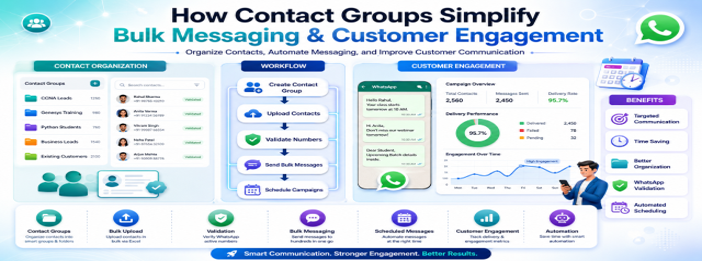
Step 1: Creating Contact Groups
The first step in using Contact Group Based Bulk Messaging Software is creating structured contact groups.
Businesses can create groups based on:
- Training batches
- Customer types
- Sales pipelines
- Service categories
- Lead status
Examples include:
- Java Leads
- CCNA Students
- Existing Customers
- Follow-up Customers
This structured approach ensures better organization and simplifies communication workflows.
Creating groups is essential for building a scalable messaging system.
Step 2: Uploading Contacts Efficiently
Once groups are created, the next step in Contact Group Based Bulk Messaging Software is uploading contacts.
Contacts can be added through multiple methods:
- Manual entry
- Copy and paste
- Excel upload
The Excel file typically includes:
- Contact Name
- Phone Number
After uploading, contacts appear as pending until validation is completed. This ensures data accuracy before messaging campaigns begin.
Efficient contact upload helps businesses manage large datasets without manual errors.
Step 3: Contact Validation for Accuracy
Validation is a crucial step in Contact Group Based Bulk Messaging Software to ensure that only active WhatsApp numbers are used for messaging campaigns.
Validation helps businesses:
- Improve message delivery rates
- Reduce failed messages
- Ensure accurate targeting
- Maintain clean databases
Only validated contacts should be included in bulk campaigns to ensure efficiency and effectiveness.
This step improves communication reliability and campaign performance.
Step 4: Sending Bulk Messages
Once contacts are validated, businesses can start sending campaigns using Contact Group Based Bulk Messaging Software.
The workflow typically includes:
- Selecting a device
- Choosing a contact group
- Writing or selecting a template
- Configuring message delay
- Sending the campaign
Messages are delivered efficiently across selected contact groups.
This allows businesses to reach hundreds or thousands of users simultaneously without manual effort.
Bulk messaging improves speed, efficiency, and scalability.
Step 5: Scheduling Automated Campaigns
One of the most powerful features of Contact Group Based Bulk Messaging Software is message scheduling.
Businesses can:
- Select a contact group
- Choose a message template
- Set delivery frequency (daily, weekly, monthly)
- Define exact timing
Once scheduled, campaigns run automatically without manual intervention.
This ensures consistent communication and improves engagement over time.
Scheduled messaging is ideal for reminders, updates, promotions, and announcements.
Benefits of Contact Group-Based Messaging
Using Contact Group Based Bulk Messaging Software provides multiple advantages for businesses across industries.
🎯 Targeted Communication
Messages are sent only to relevant groups, improving engagement.
⚡ Time Efficiency
Businesses can send messages to hundreds of contacts in one go.
📊 Better Organization
Contacts are structured into meaningful categories.
🤖 Automation
Campaigns can be scheduled and automated.
📱 Improved Delivery Accuracy
Validation ensures only active numbers are used.
📋 Consistent Messaging
Templates ensure uniform communication across campaigns.
These benefits make communication more structured and effective.
Real-World Use Cases
Training Institutes
Training centers use Contact Group Based Bulk Messaging Software for:
- Batch reminders
- Course updates
- Webinar invitations
Sales Teams
Sales departments use it for:
- Lead nurturing
- Follow-ups
- Product promotions
Customer Support
Support teams benefit from:
- Appointment reminders
- Renewal notifications
- Service updates
Business Marketing
Marketing teams use it for:
- Promotional campaigns
- Event announcements
- Customer engagement
This makes contact group-based messaging useful across multiple industries.
Why Contact Groups Improve Engagement
A major advantage of Contact Group Based Bulk Messaging Software is improved engagement.
When messages are relevant to the audience, users are more likely to respond. Instead of sending generic messages, businesses can tailor communication based on group segmentation.
This results in:
- Higher open rates
- Better response rates
- Improved customer satisfaction
- Stronger relationships
Relevance is key to successful communication, and contact grouping ensures that.
Automation in Modern Communication
Automation is essential for scaling communication efficiently.
With Contact Group Based Bulk Messaging Software, businesses can automate:
- Message delivery
- Campaign scheduling
- Follow-ups
- Reminders
This reduces manual workload and ensures timely communication.
Whatsapp group management software helps businesses maintain consistency and reliability in customer engagement.
Scalability and Business Growth
As businesses grow, communication complexity increases. Managing thousands of contacts manually becomes impossible without automation tools.
Contact Group Based Bulk Messaging Software provides scalability by allowing businesses to:
- Manage large contact databases
- Run multiple campaigns simultaneously
- Handle diverse customer segments
- Maintain structured communication systems
This scalability supports long-term business growth and operational efficiency.
Conclusion
Modern businesses need efficient systems to manage communication at scale. Manual messaging is no longer practical for organizations dealing with large customer databases.
Contact Group Based Bulk Messaging Software solves this challenge by offering structured contact grouping, validation, bulk messaging, and automated scheduling.
By organizing contacts into meaningful groups and automating campaigns, businesses can improve engagement, save time, and enhance communication efficiency.
Whether you are managing training batches, sales leads, or customer databases, contact group-based messaging provides a powerful and scalable solution for modern communication needs.